Recursively delete a directory in all folder.
e.g. ".svn" folder

$ find . -type d -name .svn | xargs rm -rf
or
$ find . -name ".svn" -exec rm -rf {} \;  // Credit: Zed Shaw, at the Mongrel mailing list.
分類: 電腦科技
Some good tutorials
Quick reference: set path, mac
To set path in mac, use the following commands
1. Check current PATH settings
echo $PATH
2. Set PATH temporarily
export PATH=$PATH:/path/
3. Set PATH permanently for USER
pico ~USER/.bash_profile
(insert this line to the file) PATH=$PATH:/path/
4. Set PATH for All Users on the mac
sudo pico /etc/paths
(insert this line to the file) PATH=$PATH:/path/
Decompiling Android .apk
Decompiling Android .apk
Scenario 1: get the string & gfx
1. Use some app e.g. ES File Explorer to extract the apk to the computer.
2. Use apktool. Download from http://code.google.com/p/android-apktool/. apktool and apktool-install-macosx.
3. do apktool d your_apk.apk
Scenario 2: get the source code
1. Same as step 1 above.
2. dex2jar : http://code.google.com/p/dex2jar/downloads/list. JD Decompiler http://java.decompiler.free.fr/?q=jdgui
3. unzip the apk to get to the classes.dex
4. dex2jar.sh classes.dex
5. drag the classes_dex2jar.jar to JD Decompiler.
Done.
Debug with dSYM
When you have a crash log sent from Apple AppReview, the file is filled with Symbolic link.
In this scenario, it is very useful to use dSYM file to debug.
dSYM file will help you to map the symbolic file to the line number of the original code.
To make XCode 4.3 or above generate dSYM file:
1) Build Settings -> Build Options -> Debug Information Format = DWARF with dSYM
2) Build Settings -> Apple LLVM compilier 3.1 – Code Generation -> Generate Debug Symbols = YES
The location of the dSYM file is shown in the following screen captures.
For developers: random crash debug
Recently discovered a bug of iOS which will cause random crash.
According to researches, the crash will appear in the possibility of range from > 0.1% to 2%.
As most experienced programmer know, this is extremely annoying type of bug.
The annoying-ness is due to the randomness, which is very hard to trace and catch.
This type of bug may spending weeks to solve one.
[ Symptom ]
If console is available, the console output should be similar to
<Error>: *** Terminating app due to uncaught exception ‘NSFileHandleOperationException’, reason: ‘*** -[NSConcreteFileHandle writeData:]: Bad file descriptor’
*** First throw call stack:
(0x3302f88f 0x34fd4259 0x3302f789 0x3302f7ab 0x376dcd15 0x376ba2a3 0xb8cfd 0xd19ad 0x3556ecab 0x355687dd 0x35536ac3 0x35536567 0x35535f3b 0x330d322b 0x33003523 0x330034c5 0x33002313 0x32f854a5 0x32f8536d 0x3556786b 0x35564cd5 0x91fff 0x91fb4)
Jun 6 19:46:30 unknown ReportCrash[270] <Notice>: Formulating crash report for process APP_NAME[268]
Jun 6 19:46:30 unknown com.apple.launchd[1] <Warning>: (UIKitApplication:com.APP_NAME.APP_NAME[0xdd2e]) Job appears to have crashed: Abort trap: 6
Jun 6 19:46:30 unknown SpringBoard[23] <Warning>: Application ‘APP_NAME’ exited abnormally with signal 6: Abort trap: 6
Jun 6 19:46:30 unknown ReportCrash[270] <Notice>: Saved crashreport to /var/mobile/Library/Logs/CrashReporter/APP_NAME_2012-06-06-194630_IPAD_NAME.plist using uid: 0 gid: 0, synthetic_euid: 501 egid: 0
The crash log should be like:
Incident Identifier: 16C417D3-236D-473E-B10B-A9072AE69273
CrashReporter Key: e69210ad08c63842187ed72017cd40c0675b8b69
Hardware Model: iPad3,3
Process: APP_NAME [11251]
…
…
0 libsystem_kernel.dylib 0x352f8004 mach_msg_trap + 20
1 libsystem_kernel.dylib 0x352f81fa mach_msg + 50
2 CoreFoundation 0x32e053ec __CFRunLoopServiceMachPort + 120
3 CoreFoundation 0x32e04124 __CFRunLoopRun + 876
4 CoreFoundation 0x32d8749e CFRunLoopRunSpecific + 294
5 CoreFoundation 0x32d87366 CFRunLoopRunInMode + 98
6 CFNetwork 0x36b59e14 CFURLConnectionSendSynchronousRequest + 340
7 Foundation 0x374854a6 +[NSURLConnection sendSynchronousRequest:returningResponse:error:] + 242
8 APP_NAME 0x0006a6fe 0x26000 + 280318
9 APP_NAME 0x0006a5fa 0x26000 + 280058
10 APP_NAME 0x00068034 0x26000 + 270388
11 APP_NAME 0x00067bc6 0x26000 + 269254
12 UIKit 0x35370ca4 -[UIApplication _callInitializationDelegatesForURL:payload:suspended:] + 1176
13 UIKit 0x3536a7d6 -[UIApplication _runWithURL:payload:launchOrientation:statusBarStyle:statusBarHidden:] + 402
14 UIKit 0x35338abc -[UIApplication handleEvent:withNewEvent:] + 1004
15 UIKit 0x35338560 -[UIApplication sendEvent:] + 48
……
……
[Solution]
The cause of the bug, is traceable back to the [NSURLConnection sendSynchronousRequest:returningResponse:error:]
responseData = [NSURLConnection sendSynchronousRequest:request returningResponse:&response error:&error];
The solution is:
1. Check if the URL opening is a redirecting URL. If so, change it to be non-redirecting.
2. Change the synchronous request to asynchronous request, with delegate.
3. Add this implementation in the handling:
– (NSURLRequest *)connection:(NSURLConnection *)connection
willSendRequest:(NSURLRequest *)request
redirectResponse:(NSURLResponse *) redirectResponse{
return request;
}
Done.
Handwriting Input Style installation instruction
Handwriting Input method is a very good function provided as default by Mac.
Below is how they are activated by user:
1. Check the installation of your trackpad.
If no trackpad detected, in Setting->Langauge & Text, the screen should be looked like the picture below.
Noted that there is no choice available about the Handwriting Input Style.

2. If you installed the trackpad correctly,the same dialog box should look like this one instead.
Just check the box next to the Handwriting Style.
Notice how the HotKey change to provide hint of how to activate.
The HotKey means: control+shift+space

Finally, the diagram below provide supplementary information of how you can find the option to install the trackpad.
You must have trackpad installed to activate Handwriting Input Style.

Flurry Agent Version code
I found not much info about flurry version available online. So I decided to write my own.
You can always find your version of Flurry, either in the file name of the downloaded batch, or inside the RELEASE_NOTES.txt file.
75 = v.3.0.7
78 = v.3.0.9
79 = v.3.1.0 (which does NOT use UDID)
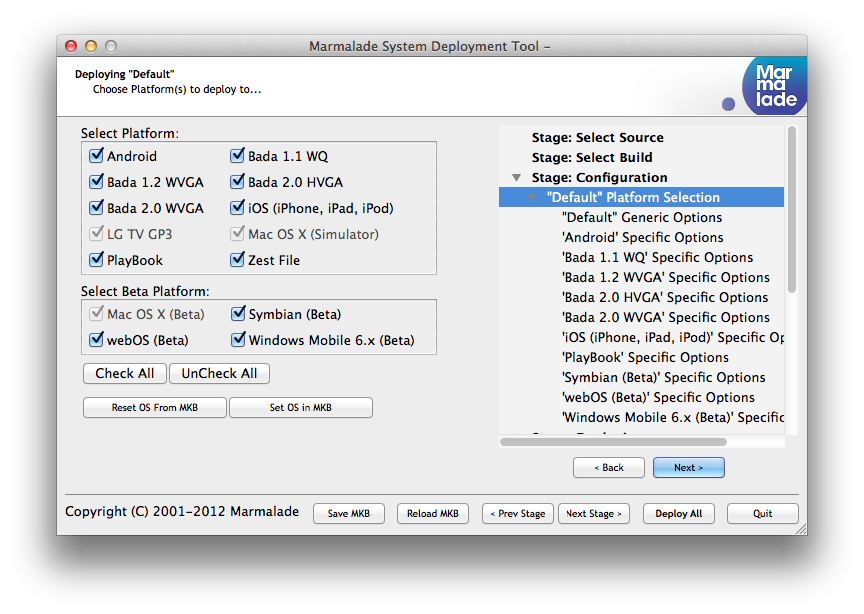
Marmalade 6.0 supported platforms
For developers: a simple way to install Android apps
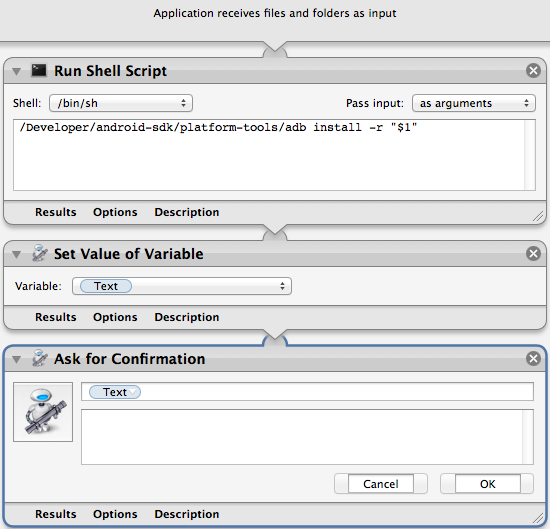
1. Create an “Application" in Automator like below. Step 2&3 is optional. Save it in /Application folder (OSX 10.7)
2. Link your *.apk to the application.
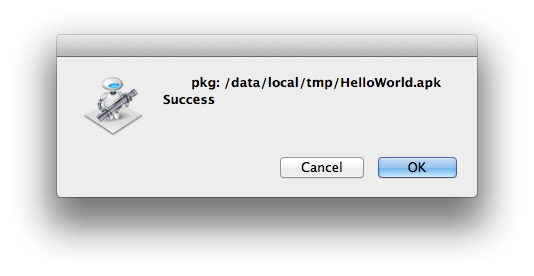
3. Double click your *.apk file. A confirmation box (shown below) will appear if you added the step 2 & 3 in the automator.
 Stories Tech Biz