bluetooth: Bluetooth support
bluez: Bluetooth tools and daemons
bluez-alsa: Bluetooth ALSA support
bluez-audio: Transitional package
bluez-compat: BlueZ 3.x compatibility binaries
bluez-cups: Bluetooth printer driver for CUPS
bluez-dbg: Bluetooth tools and daemons (with debugging symbols)
bluez-gstreamer: Bluetooth GStreamer support
bluez-pcmcia-support: PCMCIA support files for BlueZ 2.0 Bluetooth tools
bluez-utils: Transitional package
libbluetooth-dev: Development files for using the BlueZ Linux Bluetooth library
libbluetooth3: Library to use the BlueZ Linux Bluetooth stack
libbluetooth3-dbg: Library to use the BlueZ Linux Bluetooth stack with debugging symbols
分類: 電腦科技
OSX Maverick AFP with Ubuntu settings
Maverick AFP with Ubuntu is having errors. Solution:
Edit /etc/netatalk/afpd.conf. At the end of the file are the default parameters:

-tcp -noddp -uamlist uams_dhx.so,uams_dhx2.so

Notice it is commented out. Uncomment the line and change it to:

-tcp -noddp -uamlist uams_dhx_passwd.so,uams_dhx2_passwd.so
Passing method as parameter in xcode
Method A:
Compare three type of “Passing Method as Parameter":
+(int) get_mutual_friend:(NSString*) fb_id completion:(void(^)(int))handler;
Method B:
+(int) get_mutual_friend:(NSString*) fb_id completion:(SEL)handler;
IMP imp = [connection methodForSelector: handler];
void (*func)(id, SEL, int) = (void *)imp;
func(connection, handler, 1);
Method C:
id block = [^{NSLog(@"Hello, world");} copy];
[button addTarget:block
action:@selector(invoke)
forControlEvents:UIControlEventTouchUpInside];
Facebook Login – Android

Steps
1. Register/Create a new app on Facebook
2. Add Android section
3. Generate Key Hash with your keystore and put to Facebook Developer
keytool -exportcert -alias your.alias -keystore your.keystore > key.bin

openssl sha1 -binary key.bin > sha.bin

openssl base64 -in sha.bin -out output.txt
4. Import Facebook SDK into your Eclipse
5. Eclipse > Project > Properties > Android > Reference. Add Facebook SDK.
6. Follow Facebook tutorial at
https://developers.facebook.com/docs/android/login-with-facebook#config
7. Facebook tutorial missed out two part. First is the meta-data with appid.
< meta-data android:name="com.facebook.sdk.ApplicationId" android:value="@string/app_id" />
Then put your app id in string.xml
8. Add the com.facebook.LoginActivity to your AndroidManifest.xml.
Done.
Base64 Encoding
寫一篇Base64 Encoding Algorithm
= Base64, Why? =
有Base64的原因,是因為電腦內部(e.g. ASCII)是用8-bit 編碼的。但這些編碼大部份都不是 printable character,就是可以在螢幕上顯示的字。
將內部的8-bit,轉換成可以在螢幕上顯示的字,就是Base64最簡單的定義。
= Base64, How? =
== Base set ==
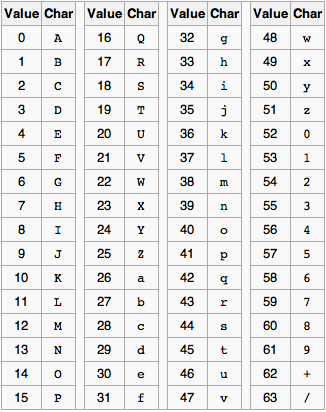
Base64之所以叫Base64,就是選用了64個printable的字作為編碼基組。
即是,任何Bit stream都可以以這64個字編碼後當printable的字來傳送。
64個字符選哪些,Base64 有多個不統一的implementation。一般最常用的是以A-Z, a-z, 0-9, +, /,這64個字符。
還有一個 = 作padding,下文再述。
== Algorithm ==
1. 將byte 變成8個bit 的1010,排成bitstream。
2. 每6個bit 一組(2^6 = 64)。不足的尾數,補上零(0)。
3. 每6個bit 編碼成base64。
4. 如此,必定會形成了「每3個byte就編成4個base64」(3*8=4*6)。
5. base64結果的長度必需為4的倍數。不足處補上等號(=)。完成。
== Check ==
1. 要檢查一個Base64是否正確,其長度必然是4的倍數。
2. 尾部只會有三個可能。一是沒有=(即應是一個Base64的字符),二是有一個=,三是有兩個=。不會有兩個=以上或其他。因為,Base64的原理,是將3個byte編成4個base64。
3. 分析。若byte除以三後:
– 剩1:兩個=(1byte=8bit,補4個零12bit,編成兩個Base64,補上兩個=,成為四個一組Base64)
– 剩2:一個=(2byte=16bit,補2個零18bit,編成三個Base64,補上一個=,成為四個一組Base64)
– 除盡:無=
完。
= Supplementary =
留意有某些SDK implementation,會有在編碼中,插入了newline character的情況。只需要看Base64的總長是否4的倍數即可分辨。
XMPP doc
Make it Technical: NSArray/NSDictionary literal syntax
Optimisation tricks for engineers
NSArray Literals
Previously:
array = [NSArray arrayWithObjects:a, b, c, nil];
Now:
array = @[ a, b, c ];
NSDictionary Literals
Previously:
dict = [NSDictionary dictionaryWithObjects:@[o1, o2, o3]
                                   forKeys:@[k1, k2, k3]];
Now:
dict = @{ k1 : o1, k2 : o2, k3 : o3 };
TestFlightApp
iOS6 > iOS5 porting
1. Facebook
2. UILabel NumberOfLines
3. NSDateFormatter yyyy-MM-dd’T’hh:mm:ssZZZZ (don’t accept a colon in ZZZZ part)
4. sqlite INSERT statement – single row
Make it Technical: 常見IOS framework build error
常見IOS framework build error
1. _SCNNetwork*
Solution: SystemConfiguration.framework
2. _NSInMemoryStoreType
Solution: CoreData.framework
3. _SSL*
Solution: Security.Framework
4. _KCF*   
Solution: CFNetwork.Framework
5. _xml*   
Solution: libxml.dylib
6. _OBJC_CLASS_$_CLLocation
Solution:CoreLocation.Framework
7. _dns_parse_resource_record _dns_free_resource_record
Solution:libresolv.dylib
8. _SCNetworkReachability*
Solution: SystemConfiguration.framework
9. _UTType* , _kUTTagClass
Solution: MobileCoreServices.framework
10. _deflate*, _inflate*
Solution: libz.dylib
11. _SecTrust*
Solution: Security.framework
12. _kCA*
Solution: QuartzCore.framework
Reference:
http://nobody-diaries.blogspot.hk/2012/10/ios-framework-build-error.html
 Stories Tech Biz